AI in Webex
Overview
Learn how Webex supports agentic AI, where Model Context Protocol (MCP) fits, and which connection model to use for your first Webex AI project.
anchorWebex is focused on agentic experiences
anchorAI assistants answer questions. AI agents can go further: they can use approved tools, work with relevant context, and take bounded actions toward a user's goal.
Webex is expanding its AI platform around that agentic model. The goal is to help agents work with trusted collaboration and contact center context while keeping identity, permissions, tool access, and administrator policy in control.
MCP is one way Webex connects agents to tools and data. It is not the whole Webex AI strategy.
anchorMCP is one part of the picture
anchorStart with the interaction your solution needs, then choose the matching connection model.
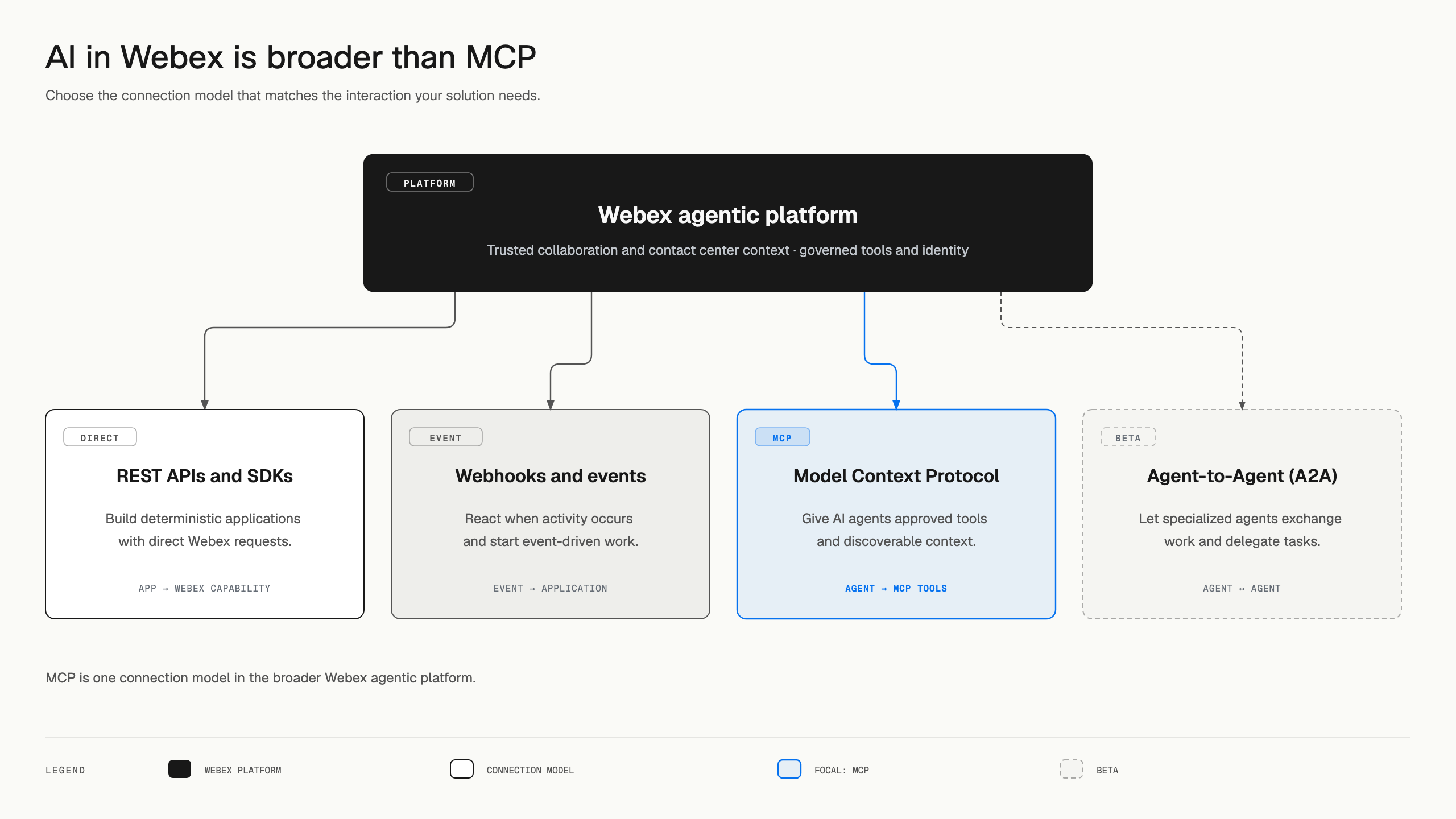
| What you want to build | Connection model | Best fit |
|---|---|---|
| An application that directly controls a defined Webex workflow | Webex REST APIs and SDKs | Deterministic application logic, direct requests, and product-specific capabilities |
| Automation that reacts when something happens in Webex | Webhooks and events | Event-driven workflows and notifications |
| An AI agent that discovers and uses approved tools or context | MCP | Natural-language intent and reusable, structured agent tools |
| Specialized agents that exchange work or delegate tasks | Agent-to-Agent (A2A), currently in beta | Agent collaboration across different domains or runtimes |
MCP servers often call REST APIs behind the scenes. A2A connects agents to agents, while MCP connects an agent to capabilities. These models can work together in one solution.
anchorTwo ways MCP connects to Webex
anchorPeople often call these patterns “inbound MCP” and “outbound MCP,” but those labels change depending on where you stand. The Webex Developer Portal names the two paths Connect Webex MCP Servers to External Clients and Connect External MCP Servers to Webex AI.
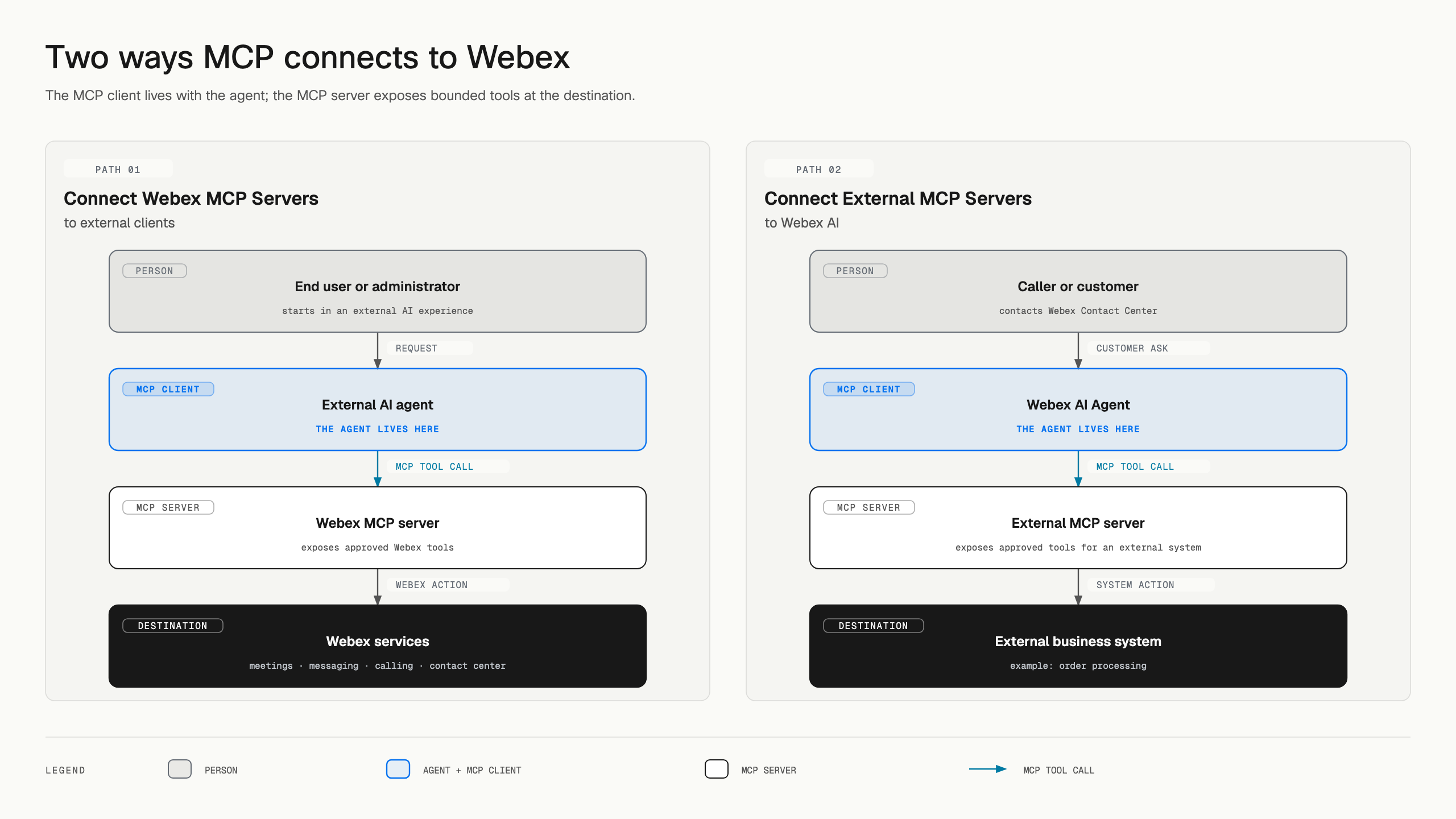
The agent lives in the external AI application used by an end user or administrator.
That external agent is the MCP client. It connects to a Webex MCP server, discovers approved tools, and uses those tools to work with Webex services on behalf of the authenticated user.
Direction: External AI agent → Webex MCP server → Webex services
The agent is the Webex AI Agent handling a customer conversation in Webex Contact Center.
A caller or customer contacts Webex Contact Center. During the live conversation, the Webex AI Agent acts as the MCP client and can call approved tools from an external MCP server, such as a server for an order processing system.
Direction: Caller or customer → Webex Contact Center AI Agent → external MCP server → external business system
Where the agent lives
| Pattern | Person starts in | Agent and MCP client live in | MCP server exposes | Destination |
|---|---|---|---|---|
| Connect Webex MCP Servers to External Clients | An external AI application | The external AI application | Approved Webex tools | Webex services |
| Connect External MCP Servers to Webex AI | A customer conversation with Webex Contact Center | Webex AI Agent in Webex Contact Center | Approved tools for a third-party service | An external business system, such as an order processing system |
Tool requests move toward the destination shown in the chart. Results return to the agent through the same connection.
anchorConnect Webex MCP Servers to External Clients
anchorChoose this path when a user or administrator wants an agent in an external AI application to work with Webex.
For example, the agent could:
- Find a meeting and retrieve its transcript.
- Search messages for a project decision.
- Draft or send an update to a Webex space.
- Review calling, workspace, video, or contact center information exposed by an available server.
The Webex MCP server does not contain the agent. It supplies tools to the external agent. The available actions depend on the selected server, the authenticated user's permissions, granted scopes, organization settings, and tool-specific controls.
Start with the Webex MCP server overview, then connect a Webex MCP server to an external client.
anchorConnect External MCP Servers to Webex AI
anchorChoose this path when the Webex AI Agent handling a live customer conversation in Webex Contact Center needs data or an action from a third-party system.
For example, the Webex AI Agent could use an order-processing MCP server to:
- Retrieve the customer's order details and current status.
- Check fulfillment or shipping information.
- Submit an approved order action when the MCP tool supports it.
- Use the result to continue the customer conversation.
In this pattern, the external MCP server does not bring its own agent into Webex Contact Center. It exposes bounded tools to the Webex AI Agent. Developers define those tools, and administrators decide which servers and tools the organization can use.
Start by learning how to configure an MCP client action in Webex AI Agent Studio. To make a server available through the Webex agentic platform, review Agentic Apps concepts and onboard your MCP server.
anchorAgentic Apps provide the governance layer
anchorAn Agentic App makes agent-facing capabilities available for discovery and administration in the Webex ecosystem. It can expose capabilities through MCP or, when available, represent an A2A agent.
The developer describes the app and its capabilities. An organization administrator can then review its authentication, enable or block access, select allowed tools, inspect schemas, and reauthorize changes.
Use these guides to continue:
anchorChoose your next step
anchor| Your goal | Next step |
|---|---|
| Learn MCP terminology and compare MCP with Webex APIs | Read the Webex MCP server overview |
| Use Webex from an external AI application | Connect Webex MCP Servers to External Clients |
| Let the Webex AI Agent use an external system during a Contact Center conversation | Connect External MCP Servers to Webex AI |
| Register your own MCP server for Webex AI | Onboard an MCP server |
| Connect agents directly to other agents | Join the beta and onboard an A2A Agentic App |
| Build a direct or event-driven Webex integration | Get started with Webex APIs and learn about webhooks |